Glitchy Times: A Distorted Serif for Creative Projects
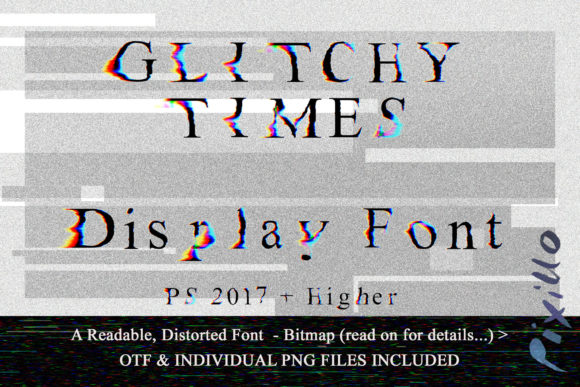
In a digital landscape saturated with uniform, clean sans-serif typefaces, there is a distinct hunger for texture and character. Glitchy Times arrives not as a replacement for the classics, but as a deliberate disruption. It is a gently distorted serif font that retains the legibility of traditional typography while introducing a unique, pixelated aesthetic. This font is designed for creators who want to inject a sense of retro-futurism or digital decay into their work without sacrificing readability.
The core appeal of this typeface lies in its hybrid nature. It combines the structural integrity of a classic serif with the chaotic charm of a bitmap error. Whether you are designing album covers, marketing campaigns for tech startups, or personal blogs that need an edge, Glitchy Times offers a versatile toolkit. The design philosophy here is practical creativity: it provides the visual impact of a glitch effect while maintaining the control needed for professional output.
Understanding the Unique Structure of Glitchy Times
What sets this font apart from standard decorative typefaces is the delivery method. While many glitch fonts rely on complex vector manipulations that can break across different software versions, Glitchy Times utilizes a dual-layer approach. You receive the main OTF file for direct text entry, alongside a comprehensive set of individual PNG characters. This scene-creator style inclusion allows for granular control that is often impossible with standard font files.
The font is built as a bitmap typeface, which means every letter has a fixed resolution. This characteristic gives it an authentic, 8-bit feel reminiscent of early computing errors. However, users must be aware of the technical constraints inherent to this format. Because it is a bitmap, there is a maximum size you can work at before the pixels become overly blocky and lose their intended aesthetic. Furthermore, the color palette is specific; the font does not render well when simply recolored using standard hue shifts, as the internal shading relies on the original pixel values.
To maintain the integrity of the design, the recommended workflow involves using color overlays or altering hues within your design software rather than changing the base color of the font itself. This ensures that the "glitch" effect remains crisp and true to the creator's vision. For those working in Photoshop 2017 and higher, Illustrator CC 2018 and above, or InDesign 2019 and newer, the compatibility is seamless, allowing for high-fidelity integration into complex layouts.
Creative Possibilities Across Different Mediums
The versatility of Glitchy Times extends far beyond simple headlines. Its ability to blend with regular Times New Roman creates a powerful juxtaposition. Imagine a blog post where the body text is a trusted, readable serif like Times New Roman, but the pull quotes or section headers are rendered in Glitchy Times. This contrast immediately draws the eye and signals a shift in tone or content focus.
- Social Media Graphics: Use the individual PNG characters to build custom captions that stand out in crowded feeds. Since each character is a separate image, you can stagger them slightly to create a motion blur effect that static text cannot achieve.
- Event Posters: For music festivals, art exhibitions, or tech conferences, the distorted aesthetic communicates innovation and non-conformity. Pairing the font with bold, solid colors enhances the retro-modern vibe.
- Educational Materials: Teachers and educators can use this font to highlight key terms or historical references to the digital age, making learning materials more engaging for students accustomed to screen-based media.
For freelancers and small business owners, the font serves as a branding asset. A logo or tagline incorporating Glitchy Times can suggest a company that is forward-thinking and unafraid to break rules. The key is balance. Overusing the distortion can lead to visual fatigue, so it is best employed sparingly as an accent rather than a primary voice.
Practical Implementation and Workflow Tips
Successfully integrating Glitchy Times into your projects requires a strategic approach. The inclusion of the PNG character set is your greatest tool for customization. Instead of typing out a word and hoping the kerning works perfectly, you can pick and choose individual letters to adjust spacing, rotation, or layering. This manual control allows you to create a message that feels organic and hand-crafted, even though it is digitally generated.
When working with the color limitations mentioned earlier, remember that creativity often thrives within boundaries. If you need a red version of the font, do not try to force the blue pixels to turn red directly. Instead, apply a color overlay adjustment layer in Photoshop or use a blending mode in Illustrator. This technique preserves the shadow and highlight details within the bitmap while shifting the overall mood of the text. It is a subtle difference that makes a massive impact on the final quality of the design.
- Layering Techniques: Combine the OTF text with the PNG elements to add depth. Place a few scattered PNG characters over the main text to simulate signal interference.
- Size Management: Always test your text at the intended final size before committing to a layout. Scaling up a bitmap font beyond its native resolution will result in jagged edges that look like mistakes rather than stylistic choices.
- Software Compatibility: Ensure your creative suite is up to date. Older versions of Adobe software may struggle with the transparency and alpha channels required for the PNG character set to blend seamlessly with backgrounds.
Adapting for Diverse Audiences and Goals
Different users have different needs, and Glitchy Times can be adapted to meet them. For marketers, the font is excellent for call-to-action buttons or limited-time offer banners where urgency and excitement are paramount. The slight distortion creates a subconscious feeling of "breaking through" the noise, encouraging users to click.
Blogger and publishers might find value in using the font for sidebar widgets or author bios. It adds a personal touch that distinguishes a writer from the generic template designs found on many platforms. By mixing the font with standard web-safe fonts, you create a hierarchy that guides the reader's eye naturally through the content.
For hobbyists and artists, the font acts as a bridge between traditional typography and digital art. The ability to treat each letter as an independent object opens up new avenues for collage work and mixed-media projects. You can cut out letters, rearrange them, and combine them with photography to tell a story that words alone cannot convey.
Ultimately, the success of any design project depends on clarity and intent. Glitchy Times is a tool that should be used to enhance communication, not obscure it. When used correctly, it transforms a flat message into a dynamic experience. It invites the audience to pause, look closer, and engage with the content on a deeper level. Whether you are building a brand identity, creating a social media campaign, or simply experimenting with new design techniques, this font offers a reliable yet unpredictable companion for your creative journey.
By respecting the technical constraints of the bitmap format and leveraging the flexibility of the PNG set, you can unlock a wide range of applications. The combination of the OTF file for speed and the PNG characters for precision ensures that you have the right tools for any situation. Embrace the distortion, experiment with the layers, and let Glitchy Times bring a fresh perspective to your next project.